Yay!Timer Persistent Mode Technology
The technology behind voice announcements that never stop—even with screen off, app in background, or phone locked.
Why Android Stops Timer Voice Announcements
Timer Apps Fail When Screen Locks
You're 15 minutes into an intense HIIT workout. You put your phone down, lock the screen, and focus on your burpees. Then... silence. The voice announcements stopped. You've missed three intervals and have no idea where you are in your workout.
This happens because Android aggressively manages background apps to save battery. When the screen turns off, the operating system may pause or kill apps running in the background—including your timer.
Android Doze & Background App Restrictions
Battery Optimization
Android limits CPU time and network access for background apps to extend battery life.
Doze Mode
When the phone is stationary with screen off, Android enters Doze mode and defers background work.
Audio Focus
Apps may lose audio focus when another app plays sound or when the system decides to prioritize other audio.
TTS Engine Limits
Text-to-Speech requires the app to be "alive" to request speech synthesis in real-time.
Pre-Generated Audio: The Persistent Mode Solution
Pre-Generated Audio File Technology
Instead of generating voice announcements in real-time during your workout, Yay!Timer's Persistent Mode pre-generates the entire audio track before you start. All voice announcements, countdowns, and silence intervals are combined into a single audio file that plays continuously—just like a music track.
Persistent Mode Audio Generation Steps
Routine Analysis
When you tap Start, Yay!Timer analyzes your entire routine—every interval, set, and repetition. It calculates exactly when each voice announcement should play.
TTS Pre-Generation
Each unique announcement text is converted to audio using your device's TTS engine. Duplicate texts (like "Work" appearing in multiple intervals) are generated once and reused, minimizing generation time.
Audio Encoding
The TTS audio segments and calculated silence intervals are combined and encoded. For routines under 60 minutes, WAV format is used for simplicity. For longer routines, efficient AAC encoding keeps file sizes manageable.
Media Player Playback
The generated audio plays through Android's Media Player API—the same system that plays music. This gives the audio high priority, allowing it to continue even when the screen is off or other apps are in the foreground.
Interval Synchronization
A precise interval map links audio timestamps to your workout intervals. When you skip forward or back, the audio seeks to the exact position for that interval. The UI stays perfectly synchronized with the audio timeline.
Audio Caching & AAC Encoding Details
Smart Audio File Caching
Generated audio files are cached securely on your device. If you run the same routine again, the cached file is reused—no regeneration needed. Only when you modify a routine is a new audio file generated.
⚡ Second run starts instantly
WAV vs AAC Format Selection
For workouts under 60 minutes, WAV format ensures maximum compatibility. For longer routines (like 90-minute coaching sessions), AAC encoding reduces file size while maintaining quality.
📊 90-minute routine ≈ 5MB AAC
Tabata Segment Reuse Caching
For routines with repeated intervals (like Tabata's 8 identical rounds), the encoder caches and reuses pre-encoded segments within a session, dramatically reducing generation time.
🏃 50% cache hit rate on Tabata
Millisecond Timing Precision
The interval mapping system tracks announcement positions with millisecond accuracy. Skip operations land precisely at the start of each interval's announcement.
🎯 <0.02% timing variance
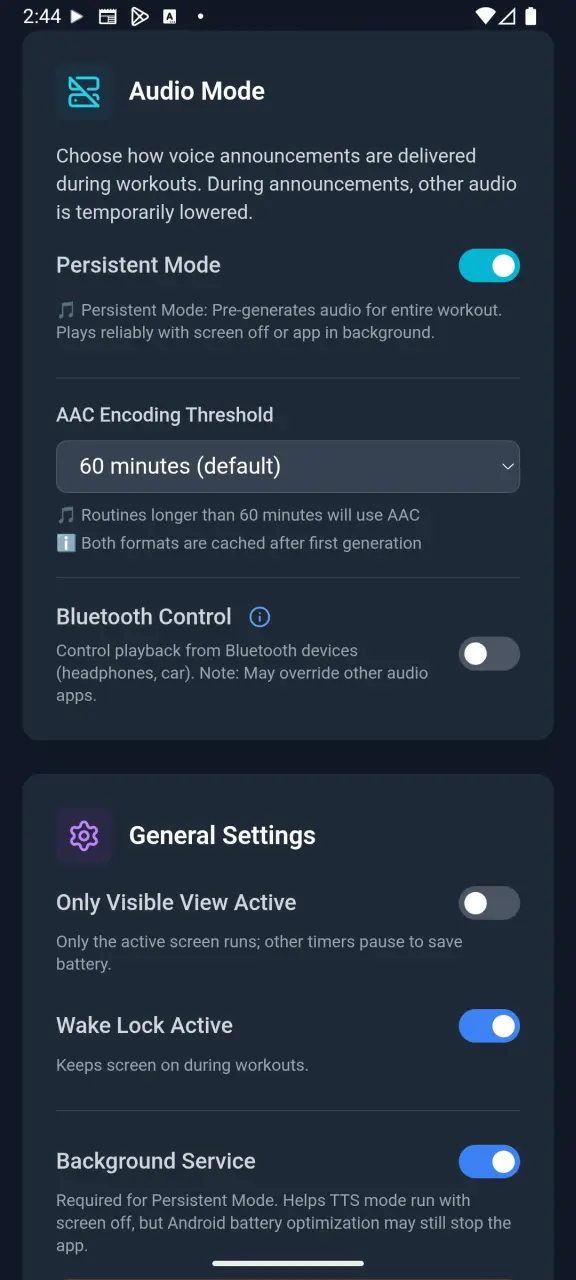
Audio mode selection in Battery Saver settings
TTS Mode vs Persistent Mode Comparison
| Feature | TTS Mode (Free) | Persistent Mode (Premium) |
|---|---|---|
| Screen Off | ❌ May stop | ✅ Continues |
| App in Background | ❌ May stop | ✅ Continues |
| Phone Locked | ❌ May stop | ✅ Continues |
| Start Time | ⚡ Instant | ⏳ Brief generation (first run) |
| Battery Usage | 🔋 Lower | 🔋 Slightly higher |
| Long Workouts | ❌ Risk of interruption | ✅ Perfect for 90+ min |
| Storage Used | 📦 None | 📦 Cached audio files |
When to Use Each Mode
- TTS Mode: Short workouts with screen on, when you want instant start with no wait time.
- Persistent Mode: Any workout where you might lock your phone, put it in your pocket, or need 100% reliability.
Explore Yay!Timer Features
Download Yay!Timer – Never Miss an Interval
Experience the reliability of Persistent Audio Mode. Download Yay!Timer free and upgrade to Premium for just $2.99.
Get Yay!Timer Free