When you're in the middle of an intense HIIT session or pushing through the final rounds of Tabata, the last thing you want is to worry about your timer. You need an interval timer that just works—one that announces your intervals clearly, even when your phone screen is off and you're focused entirely on your workout.
That's exactly why Yay!Timer was built. Unlike typical timer apps that fail when your screen turns off, Yay!Timer's Persistent Mode ensures voice announcements continue reliably throughout your entire workout, no matter what.

Essential HIIT Timer Features
High-Intensity Interval Training (HIIT) and Tabata workouts demand precision timing. Whether you're doing 20 seconds of burpees followed by 10 seconds of rest, or longer intervals for endurance training, your timer needs to handle specific requirements:
What You Need
- ✓ Audio cues that work with screen off
- ✓ Clear voice announcements
- ✓ Customizable work/rest intervals
- ✓ Works with your music
- ✓ Bluetooth headphone support
- ✓ No distracting ads during workout
Common Problems
- ✗ Timer stops when screen turns off
- ✗ Voice cuts out in background
- ✗ Can't hear over your music
- ✗ Complicated setup process
- ✗ Ads interrupt your workout
- ✗ Only works in one language
Android Screen-Off Voice Problem & Persistent Mode Solution
Here's a frustrating scenario every HIIT enthusiast knows: You set up your timer, start your workout, pocket your phone, and... silence. Your phone's screen turned off, and Android killed the audio to save battery. You've missed three intervals and your workout is ruined.
Most timer apps use Android's Text-to-Speech system, which Android considers "non-essential" when your screen is off. The operating system aggressively suspends these apps to save battery, leaving you without audio cues exactly when you need them most.
Pre-Generated Audio for Screen-Off Workouts
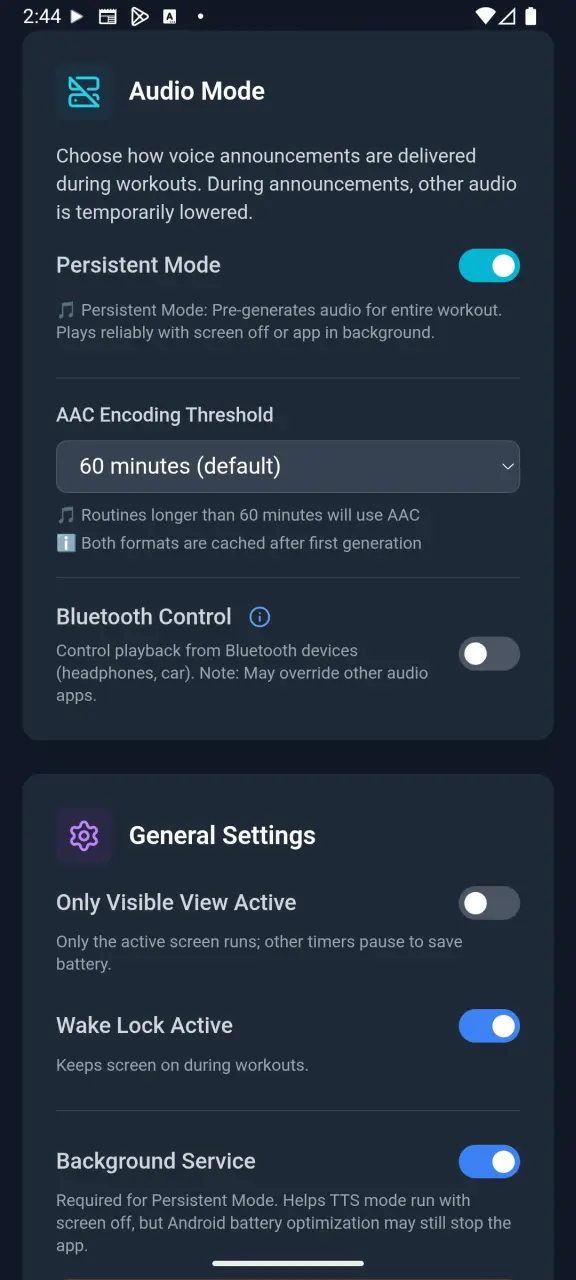
Yay!Timer's Persistent Mode takes a completely different approach. Before your workout starts, it pre-generates a single audio file containing all your voice announcements for the entire routine. This audio file plays as music—which Android never interrupts—ensuring your announcements continue reliably no matter what.
The result? Rock-solid voice announcements that work with your screen off, with your phone locked, while you're running other apps, or even when you're listening to music (it ducks your audio during announcements).
Create a Tabata 20/10 Routine Step by Step
The classic Tabata protocol consists of 20 seconds of all-out work followed by 10 seconds of rest, repeated 8 times for a total of 4 minutes. Here's how to set it up:
Open the Interval Timer
Launch Yay!Timer and select the Interval Timer from the main menu. You'll see your existing routines or can create a new one.
Create a New Routine
Tap the + button and give your routine a name like "Tabata" or "4-Minute HIIT". Choose a color to help identify it quickly.
Add Work and Rest Intervals
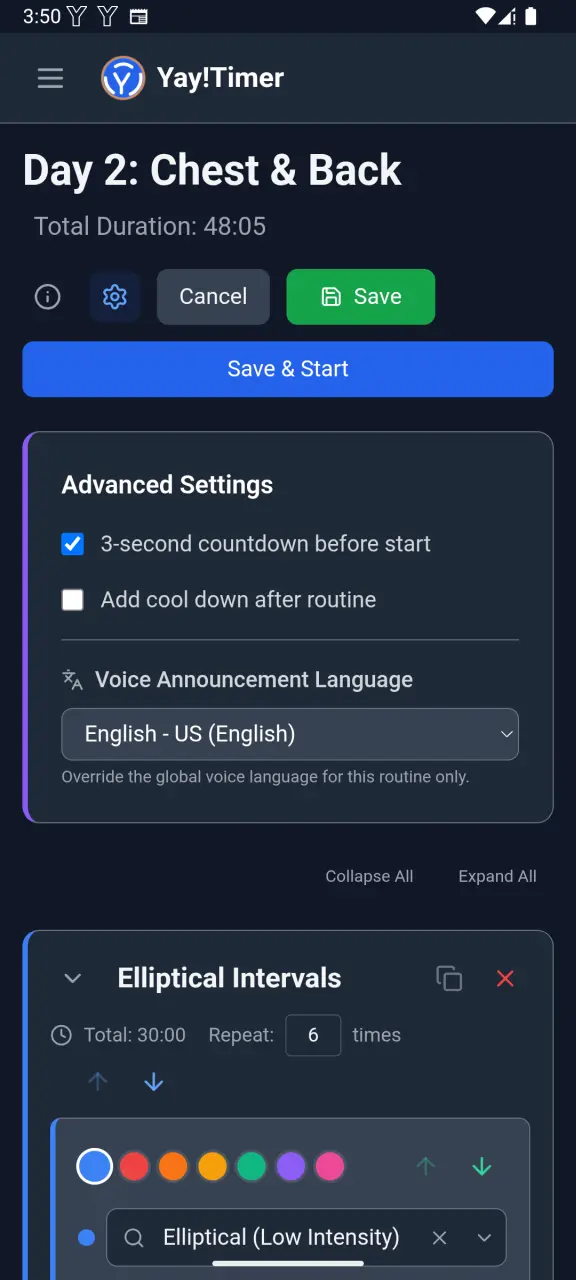
Add a "Work" interval (20 seconds) and a "Rest" interval (10 seconds). Use contrasting colors—like red for work and blue for rest—for quick visual identification.
Set Repetitions
Configure your routine to repeat 8 times. You can also add a warm-up countdown at the beginning and a cool-down at the end.
Enable Persistent Mode
Go to Settings → Audio Mode and select "Persistent Mode" to ensure voice announcements work reliably with your screen off.
Start Your Workout!
Hit play and focus on your workout. Yay!Timer will announce each interval clearly, even if you lock your phone or switch to your music app.
HIIT Voice Announcement Benefits
During high-intensity intervals, you can't be checking your phone. You're focused on your form, your breathing, and pushing through the burn. Voice announcements solve this by keeping you informed without breaking your flow:
Hands-Free Interval Training
No need to look at your screen. Keep your focus on your burpees, not your phone.
Spotify & Music App Integration
Your workout playlist keeps playing. Announcements duck the music briefly, then it resumes.
32 Voice Languages Available
Hear announcements in your native language, or use it to practice a new one while you train.
Persistent Mode Screen-Off Audio
Lock your phone and put it aside. Persistent Mode ensures announcements continue reliably.
Popular HIIT & Tabata Workout Templates
Classic Tabata
20 seconds work / 10 seconds rest × 8 rounds = 4 minutes
The original protocol developed by Dr. Izumi Tabata. Maximum intensity work periods with minimal rest.
30/30 HIIT
30 seconds work / 30 seconds rest × 10 rounds = 10 minutes
Slightly longer intervals with equal rest. Great for beginners building up to more intense protocols.
EMOM (Every Minute on the Minute)
Work at the start of each minute, rest for remainder × 10-20 minutes
Popular in CrossFit. Complete a set number of reps, then rest until the next minute starts.
Pyramid Intervals
20s → 30s → 40s → 30s → 20s work with 10s rest between
Varying interval lengths keep your body guessing and prevent adaptation plateaus.
Yay!Timer vs. Typical HIIT Timer Apps
| Feature | Yay!Timer | Typical Apps |
|---|---|---|
| Voice with screen off | ✓ Reliable (Persistent Mode) | ✗ Often fails |
| Languages supported | ✓ 32 languages | 1-3 languages |
| Music integration | ✓ Audio ducking | Limited or none |
| Bluetooth controls | ✓ Full support | Sometimes |
| Privacy | ✓ No account needed | Often requires login |
| Pricing | ✓ Free / $2.99 one-time | Subscriptions $5-10/month |
Ready to Level Up Your HIIT Training?
Download Yay!Timer free from Google Play and experience the difference reliable voice announcements make for your workouts.
Get Yay!Timer Free