Pomodoro Technique Explained: 25/5 Work-Break Cycles
The Pomodoro Technique is a time management method developed by Francesco Cirillo in the late 1980s. The concept is beautifully simple: work in focused 25-minute intervals (called "pomodoros") followed by short 5-minute breaks. After four pomodoros, take a longer 15-30 minute break.
This technique works because it leverages how our brains function. We can maintain intense focus for short periods, but our attention naturally wanes over time. By building in regular breaks, you actually accomplish more than if you tried to work continuously.
Classic Pomodoro Timer Cycle
Mobile Pomodoro Timer vs Desktop Apps
While kitchen timers and browser extensions work, a mobile timer app offers unique advantages for Pomodoro practitioners:
Portable Focus Timer
Coffee shop, library, home office, or commuting—your timer is always with you.
32-Language Voice Alerts
No need to watch your screen. Hear when it's time to take a break or get back to work.
Spotify & Focus Music Ducking
Keep your focus playlist playing. Announcements duck the audio, then music resumes.
Pomodoro Session History
Review your productivity history and see how many pomodoros you complete each day.

Yay!Timer Pomodoro Features
Most Pomodoro apps are basic—they just count down and beep. Yay!Timer takes a different approach with features specifically designed for deep work:
🔊 Persistent Mode Voice Alerts
When you're deep in focus, you don't want to check your phone. Yay!Timer's voice announcements tell you when your pomodoro ends and when your break is over—even if your screen is off. With Persistent Mode, these announcements are 100% reliable.
🎵 Keep Your Focus Music Playing
Many people use lo-fi beats or ambient music to help focus. Yay!Timer's audio ducking feature briefly lowers your music volume during announcements, then brings it right back. Your flow state stays uninterrupted.
⚙️ Custom Pomodoro Interval Settings
Not everyone works best with 25/5. Some prefer 50/10, others like 45/15. Create any interval structure that works for you, and save multiple variations for different types of work.
🔒 Privacy-First Focus App
No account required. No cloud sync. Your productivity data stays on your device. Focus on your work, not on privacy concerns.
Pomodoro Timer for Students
The Pomodoro Technique is especially powerful for students. Whether you're studying for exams, writing papers, or working through problem sets, structured focus time helps you retain more information and avoid burnout.
Student Study Tips with Pomodoro Timer
- One subject per pomodoro: Complete focus on a single topic reduces context switching.
- Review during breaks: Quickly glance over what you just learned during your 5-minute break.
- Use voice in your study language: If you're learning French, set announcements to French for extra immersion!
- Track your study sessions: Use Yay!Timer's history to see your study patterns and optimize.
Many students find they can study for 3-4 hours effectively with Pomodoro, compared to struggling through 1-2 hours of unfocused work. The key is respecting both the work periods and the breaks.
Pomodoro Timer for Remote Workers
Working from home comes with unique challenges: household distractions, difficulty "switching off," and the temptation to check social media. Pomodoro helps create structure in an unstructured environment.
Morning Deep Work
Start your day with 4 pomodoros on your most important task. Voice announcements let you stay focused without clock-watching.
Meeting Recovery
After a Zoom call, do one pomodoro to regain focus before checking email or Slack.
Email Batching
Dedicate specific pomodoros to email processing instead of checking constantly.
Work-Life Boundaries
When your last pomodoro ends, you're done. Clear boundaries prevent overwork.
Create Custom Pomodoro Routines in Yay!Timer
Yay!Timer makes it easy to create different Pomodoro variations for different needs:
Classic Pomodoro
The original format. Perfect for general tasks and starting out.
Extended Focus
For deep work that requires longer concentration periods.
Quick Tasks
For admin work, emails, or when you're having trouble focusing.
Ultradian Rhythm
Based on natural 90-minute focus cycles. Great for creative work.
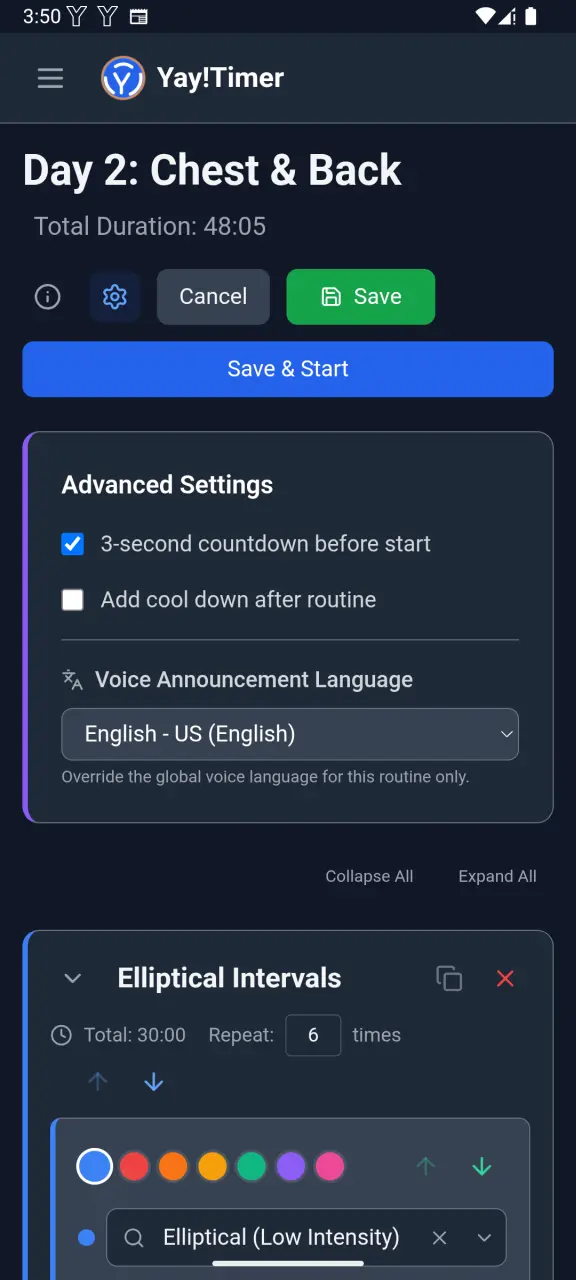
Bonus: Language Learning with Pomodoro
Here's a creative use: set Yay!Timer's voice announcements to the language you're learning. Every time you hear "Focus time is over. Time for a break" in Spanish, French, or Japanese, you're getting micro-exposure to your target language.
With 32 languages available, Yay!Timer supports learners of almost any major language. You can even set different routines to use different languages!
Start Your First Pomodoro Session
Download Yay!Timer free and set up your perfect Pomodoro routine in minutes. Voice announcements let you focus completely on your work.
Get Yay!Timer Free